




Online proxies: what they are, how they work, and what they are used for
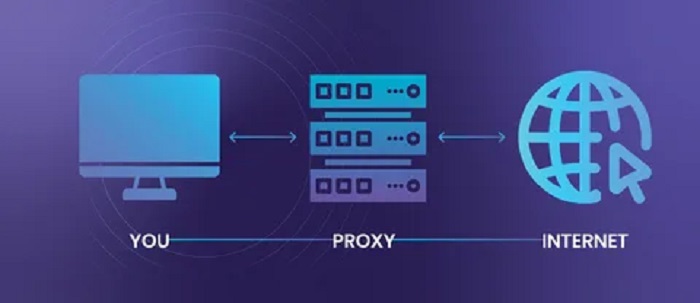
An online proxy is an intermediary server situated between the user and the target website; it accepts requests, forwards them, and relays the response back. This approach allows for hiding the real IP address, managing network restrictions, and enhancing traffic control—factors crucial for privacy and reliable interaction with web resources.
At its core, an online proxy serves as a routing tool: it replaces the internet «exit point,» helps bypass blocks, distributes load, and enables access to services from various regions. Practical applications utilize different proxy types (HTTP/HTTPS, SOCKS), with the choice depending on required speed, anonymity levels, and application compatibility with ua proxy online.
What happens to a user request when using a web proxy?
When using a web proxy, the user’s request does not go directly to the intended site but first reaches the proxy server. The user interacts with the web proxy via a browser—entering a URL, clicking a link, or submitting a form—whereupon the original HTTP/HTTPS request is redirected to the proxy, acting as an intermediary between the client and the target resource.
The web proxy then generates a request to the target site on its own behalf, receives the response, and relays it back to the user.
As a result, the external resource usually sees the proxy server itself—rather than the user’s device—as the source of the request, although the actual degree of «concealment» depends on which headers are transmitted and how the service is configured.
Request route: from browser to site and back
When a user requests a page via a web proxy, the proxy receives the incoming data (address, parameters, and sometimes cookies) and determines exactly how to access the target site. At this stage, various rules may be applied: allowed domains, method restrictions (GET/POST), request body size limits, and filtering of dangerous or prohibited parameters.
The proxy then initiates an outbound connection to the target server and forwards the request. Modifications may occur during this process: the proxy might add service headers, alter the order or composition of headers, normalize the URL, and control what client data is «passed through.» For instance, some proxies add the original IP address to the headers, while others aim to minimize the client’s digital footprint.
Upon receiving the response from the site, the web proxy analyzes it and forwards it to the user. Additional processing may take place, such as decompression or compression, link replacement, element blocking, header removal or modification, and content caching to speed up subsequent requests. The user’s browser receives the «proxied» response, though visually, the process usually resembles a standard page load.
HTTPS, headers, and session data specifics
With HTTPS, the situation depends on the type of web proxy. If a proxy operates as an intermediary at the web application level, the secure connection may terminate at the proxy, which then establishes a separate HTTPS connection to the target site. This means the proxy is technically capable of viewing the decrypted traffic content within its own infrastructure; therefore, trusting the service and understanding its data handling policy is critical.
Session behavior is influenced by cookies and other identifiers that the proxy receives and returns along with responses. Depending on the implementation, a web proxy may store cookies locally or pass them through to the client; in either case, user requests can be linked into a single session, just as with standard direct access. However, the proxy can intervene in which cookies reach the site and return from it, which sometimes causes issues with logging in or using interactive features.
HTTP headers play a key role, as they often reveal details about the client’s environment. The actual connection chain may involve elements that affect the user’s «visibility» to the site:
- The IP address seen by the site will usually be the proxy’s address, though additional headers may indicate the client’s original address.
- The User-Agent and language settings typically originate from the user’s browser, unless the proxy modifies them.
- The Referer and URL parameters can reveal where the user came from and what actions they performed, unless the proxy strips this data.
- Cookies support authorization and personalization but may be handled differently when passing through a proxy, potentially affecting session stability.
Hello!! My name is Jeanine
I love to eat, travel, and eat some more! I am married to the man of my dreams and have a beautiful little girl whose smiles can brighten anyone’s day!